
Discover How Much More Your Phone Can Do
People rely on smartphones daily for making calls, sending messages, capturing photos, and running a handful of preferred applications. Deep within these devices, however, exist numerous built-in features waiting to simplify routines, boost efficiency, and support overall well-being.
Small adjustments on either an iPhone or Android device can transform the entire experience, leading to faster operation, greater convenience, and noticeable benefits for eye comfort and battery health.
Explore these helpful smartphone features that can enhance everyday life in meaningful ways.
Silence Incoming Calls in an Instant
Everyone has experienced that sudden ringtone interrupting an important meeting, a quiet restaurant dinner, or a movie theater scene. Reaching for the screen and searching for the mute option often creates unnecessary stress.
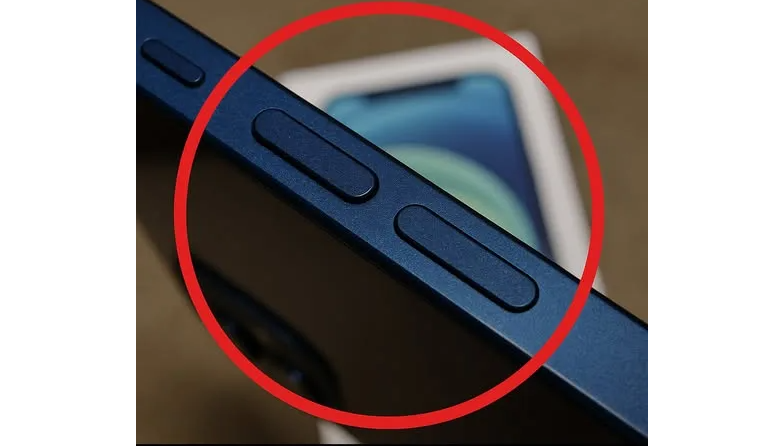
A faster solution exists. Press and hold the volume-down button once, and the ringer stops immediately. The incoming call remains active (so the caller stays connected), yet all sound disappears without drawing attention. This discreet method restores calm in seconds.
Launch the Camera Before the Moment Disappears
Memorable scenes appear and vanish quickly — a child’s first steps, a beautiful sunset, or a street performer at the perfect angle. Unlocking the phone, typing a passcode, and opening the camera app usually takes far too long.
Built-in shortcuts solve that problem:
- On iPhone: Swipe left directly on the lock screen, and the camera opens instantly.
- On Android: Double-tap the power button, regardless of whether the screen is locked.
These actions require less than a second and have saved countless irreplaceable photographs for millions of users worldwide.
Turn Your Home Screen Into a Command Center With Widgets
Widgets remain one of the most powerful yet underused capabilities on modern phones. They place live information, controls, and quick actions right on the home screen, eliminating the need to open individual apps.
Consider adding some of these helpful widgets:
- Weather widgets that display current conditions and hourly forecasts at a glance.
- Calendar widgets showing upcoming appointments and deadlines without extra taps.
- Music playback controls that let you pause, skip tracks, or change volume instantly.
- Fitness and wellness widgets tracking daily steps, hydration goals, or sleep patterns.
A thoughtfully arranged home screen with the right widgets creates a personalized dashboard that feels intuitive and responsive every time you pick up the phone.
Give Your Eyes a Break With Dark Mode
Spending hours in front of bright screens has become part of daily life for most people, and tired, dry eyes often follow. Prolonged exposure to intense white backgrounds contributes to digital eye strain, discomfort, and difficulty falling asleep.
Dark Mode reverses the color scheme, displaying light text on dark backgrounds. This change reduces glare significantly, especially in low-light environments, while creating a modern, elegant appearance. On devices with OLED or AMOLED displays, Dark Mode also consumes less power because black pixels turn off completely.
Both iOS and Android offer system-wide Dark Mode in the display settings, and nearly every major app now supports it automatically. Enable it once, and the entire phone transforms into a more comfortable viewing experience.
For additional relief, many eye-care professionals recommend the 20-20-20 technique: every twenty minutes, look at an object at least twenty feet away for a full twenty seconds. This short break relaxes eye muscles and refreshes focus.
Extend Battery Life Without Sacrifice
Running out of power at the worst possible moment creates frustration. Fortunately, several built-in options help the battery last considerably longer throughout the day.
Effective strategies include:
- Activating Low Power Mode on iPhone or Battery Saver on Android to pause non-essential background processes.
- Allowing Auto-Brightness to adjust screen intensity based on surrounding light.
- Turning off background app refresh for applications that do not require constant updates.
- Removing seldom-used apps, particularly those known for heavy resource usage such as games or streaming services.
Applying these settings often adds multiple extra hours of use and helps preserve the battery’s long-term capacity.
Keep Your Phone Fast and Responsive
Over weeks and months, cached files, forgotten downloads, and background processes accumulate, causing slowdowns and sluggish performance.
A brief monthly maintenance routine restores speed:
- Clear the cache of frequently used apps to delete temporary files taking up space.
- Restrict background activity for apps that do not need real-time updates.
- Delete duplicate photos, old screenshots, and applications no longer in use.
- Install the latest software updates, which frequently contain valuable performance enhancements and security improvements.
Devices that receive regular care feel noticeably quicker and more enjoyable to use over the years.
Unlock the True Power Hidden in Your Pocket
Today’s smartphones possess remarkable capabilities far beyond basic calling and texting. Mastering these built-in features — from instant camera access and eye-friendly display options to longer battery life and smoother performance — turns an ordinary device into a highly efficient personal assistant.
Start experimenting with one or two of these suggestions today. The difference in convenience, comfort, and overall satisfaction becomes evident almost immediately. Your phone already contains everything needed to work smarter, save time, and support healthier habits — all that remains is putting these powerful tools into action.